
From 1st January 2024, employers are required to submit details of three categories of Non Taxable Expenses to Revenue every time payment is made to an employee for these expenses – most importantly, these details needs to be reported by the employer to Revenue ‘on or before’ payment is made to the employees.
After updating a pay period, Thesaurus Payroll Manager will automatically create the Payroll Submission Request required by Revenue and you will see that process icon 6 will immediately prompt you that the submission is outstanding: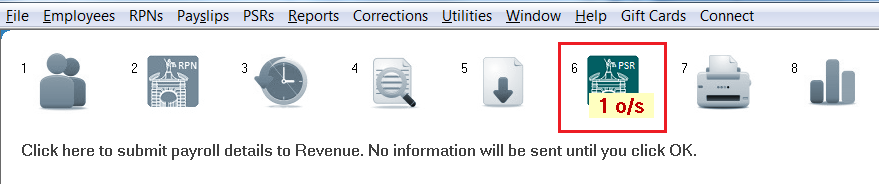
- To therefore submit your PSR to Revenue after you complete each pay run, click Process Icon No. 6, followed by ‘Prepare PSR’:
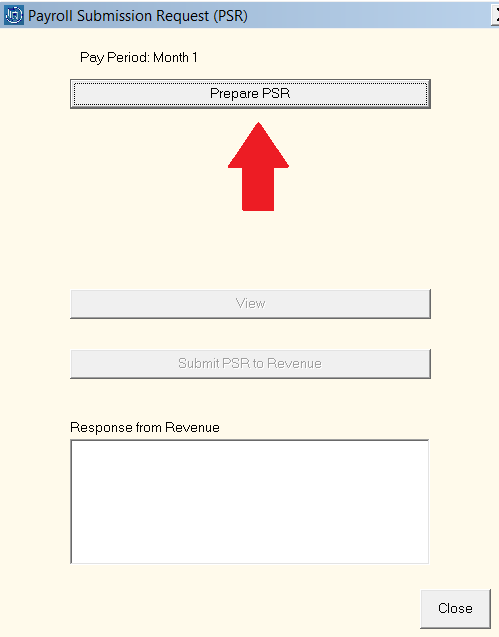
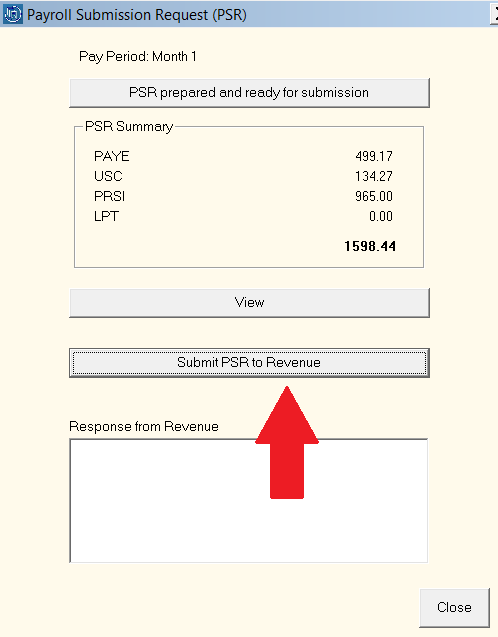
A summary of the PAYE, USC, PRSI & LPT totals included in the submission will be displayed on screen for you to view.
- Should you wish to view the detailed contents of the PSR before submission, click 'View'.
- When ready to do so, click ‘Submit PSR to Revenue’:
As soon as the submission is successfully received by Revenue, a confirmation response will be received back into the software confirming successful receipt, as well as the total amount of taxes that were included in the submission.
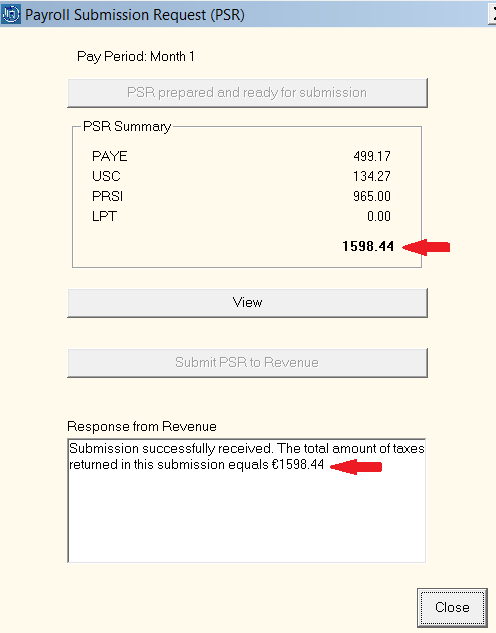
- Press 'Close' to exit the PSR utility.