
If you operate an approved occupational pension scheme, a Pension Board (PB) reference number will have been created for you during the registration process. This number should be entered on the payroll submission to Revenue, in order to allow prospective retirees to track pension entitlements from different employments during their careers.
Within the payroll software, the PB reference number is known as the Pension Tracing Number. This must be entered in each applicable employee's record as follows:
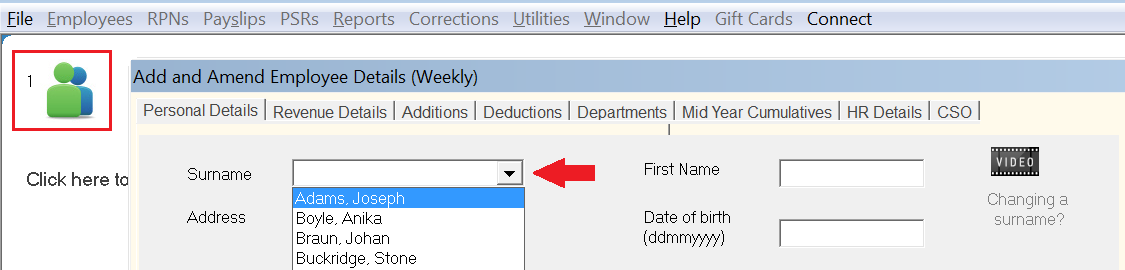
- Within Add/Amend Employees, select the employee using the drop down menu
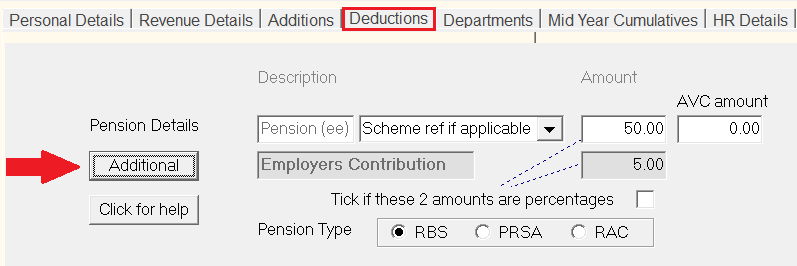
- Within the employee's Deductions screen, click Additional
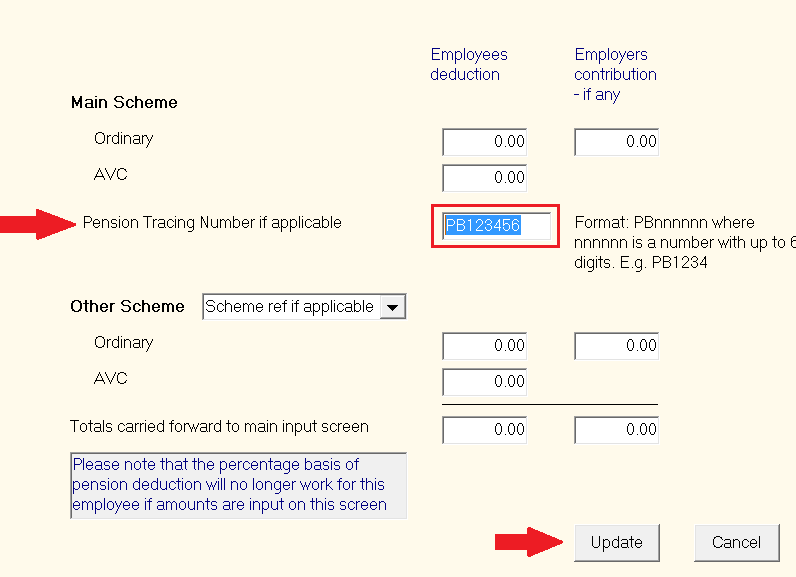
- Enter the Pension Tracing Number in the field provided - the Pension Tracing Number will be in the format of PBnnnnnn, where 'nnnnnn' is a number with up to 6 digits, e.g. PB123456
- Click Update
The Pension Tracing Number will now be included for that employee on the payroll submission to Revenue going forward.
- Repeat the above steps again for subsequent employees for which a Pension Tracing Number applies.