
Earnings, Hours & Employment Costs Survey (EHECS)
The Central Statistics Office (CSO) conduct a quarterly earnings survey which covers all sectors of the economy with the exception of Agriculture, Forestry and Fishing.
Purpose of the Survey
The Earnings, Hours & Employment Costs Survey (EHECS) enables the Central Statistics Office to compile regular and timely labour cost indices for the purpose of monitoring change in labour costs in Ireland and across the European Union.
If asked to completed this survey by the CSO, Thesaurus Payroll Manager provides a feature that can assist with completing this.
- To access this feature, go to Utilities > CSO - EHECS
Complete the following mandatory fields:
- Enter 'CSO Enterprise Number' in box provided
- Choose 'Quarter'
- Enter 'Contact name'
- Enter 'Phone number'
- Enter 'Email address'
- Enter 'Position' in the company
- Enter 'Date'
- Enter 'Comment' if applicable
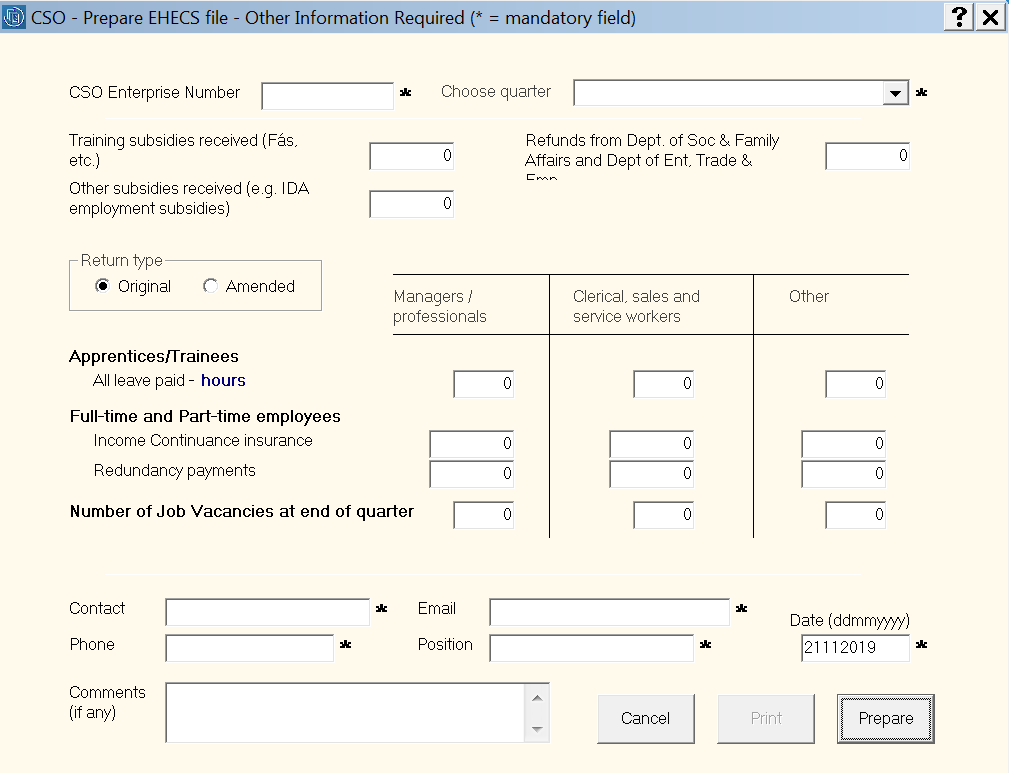
Other fields that may need to be completed, if applicable:
- Training subsidies received (e.g. Fás)
- Other subsidies received (e.g. IDA employment subsidies)
- Apprentice/Trainee hours paid
- Income continuance insurance
- Redundancy payments
- Number of job vacancies at end of quarter
Once all appropriate fields are complete:
- Click 'Prepare'
- Click 'Save'
- Click 'Ok'
- The contents of the EHECS file will be displayed in your Internet browser together with a detailed explanation of each statistic. You are now ready to upload the EHECS file online, simply logon to the CSO secure deposit box - Go to https://lodgedata.cso.ie
- Click 'Print' for a file copy of your EHECS Report
Uploading your EHECS File to CSO
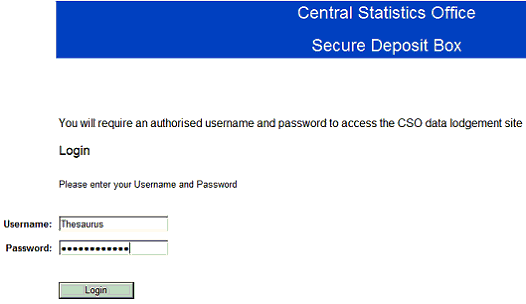
Go to https://lodgedata.cso.ie > Click Login
- Enter Username (Username is case sensitive)
- Enter Password (Password is case sensitive)
- Click drop down arrow next to CSO Survey Name
- Select Earnings, Hours & Employment Costs Survey form (EHECS)
- Click Browse
- Select C: drive
- Open CSO folder
- Select survey - normally in the format EN12345678_2022_1_10042015170023.xml
- Add any comments you wish to send with the attached file
- Click Lodge Data button to complete data lodgement of EHECS
Supplementary CSO Returns
In the event you need to complete a supplementary CSO return, this is also facilitated within Thesaurus Payroll Manager.
- go to Utilities > CSO - EHECS
- At the bottom of the CSO screen, simply tick to indicate that 'this is a supplementary return'
- Complete all relevant fields accordingly and Prepare