
The Payroll Summary/Audit Trail report is a periodical analysis of payments made to all employees. The report can be run for any one week/month/fortnight OR for a range of weeks/months/fortnights.
To access this report go to Process ICON no. 8 or Reports > Payroll Summary/Audit Trail
- Select the weeks or months you wish to view by simply choosing the period number from the drop down options From and To
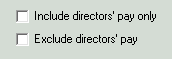
- Depending on your reporting requirements you can exclude Directors' Pay from the report by flagging the box
- Alternatively if you wish to report on Directors' Pay only simply flag this option
- Click OK to prepare the report
- Click Yes if you would like the report sorted alphabetically
- Click No if you would not like the report sorted alphabetically
- Click Print to print the full report. Select Yes should you also wish to print departmental information.
- If you wish to view a summary report only - click Tick for summary, followed by Print to print this summary only.
Copying/ Exporting the Report
All reports can be copied to a worksheet e.g. excel. Run the report as per the steps above, then:
- Click Copy
- The report will be copied to clipboard and is ready to be pasted to your chosen worksheet
- Open the worksheet e.g. excel
- Click Edit
- Click Paste OR CTRL V
Saving the Report in HTML format
All reports can be copied to HTML format. Run the report as per the steps above, then:
- Click HTML
- The HTML file will be copied to your default drive & directory e.g. C:/ThesaurusPayroll2026/
- This file can subsequently be attached to an email from this location
Emailing the Report
Alternatively, this report can be emailed directly from the software. To email reports directly from the software, an email address for 'report emailing' is required in File > Amend Company Details. Please note, it is also advisable to enter a password to protect PDF reports.