
The HR Details section in the software enables you to record personnel details for all employees. This section is optional.
To access this utility, go to Process ICON no. 1:

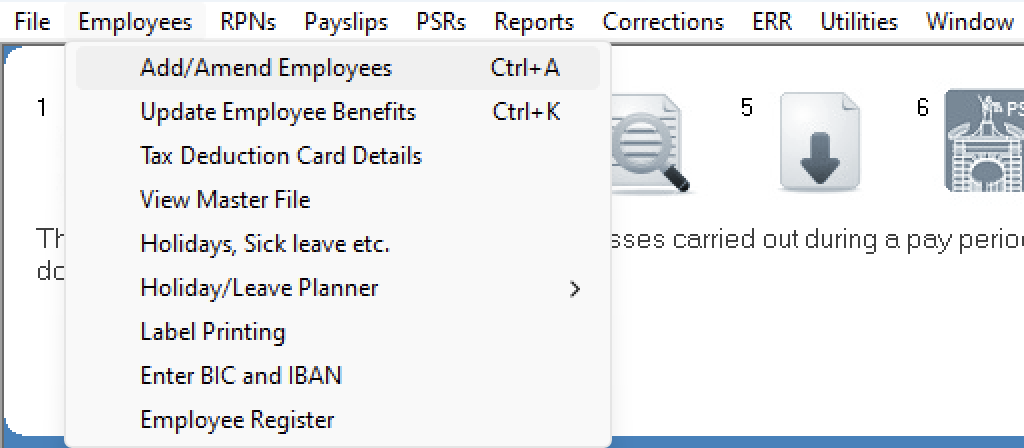
or Employees > Add/Amend Employees:
Within the employee record, select the 'HR' tab:
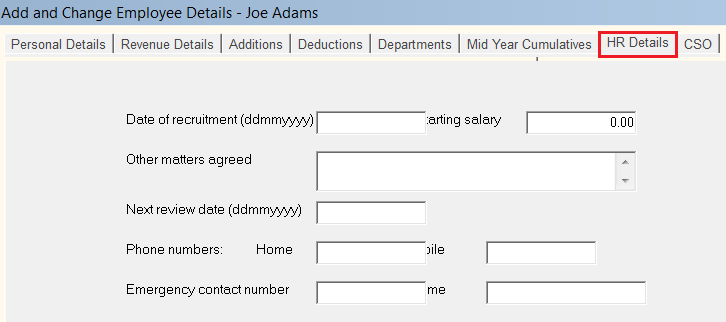
- Enter the employee's Date of recruitment, if applicable
- Enter the employee's Starting salary, if applicable
- Enter Other matters agreed, if applicable
- Enter the employee's Next review date, if applicable - the software will prompt you when a review is pending for an employee. As each review is complete, it is important to change the review date to ensure that the payroll software prompts the next review.
- Enter contact Phone numbers, if applicable
- Enter any Medical information, if applicable
- Enter any Other information, if applicable
- If using Thesaurus Connect (an optional add-on to the Thesaurus Payroll Manager software) and wish to mark the employee as confidential, tick the box provided
- Click Update to save the employee information
Please note: an Employee Detail Request Form (in PDF format) is also available within this section for your use. Simply click on the link provided on the screen to access and print this form to give to an employee for completion.